
Set Up Automations
Every signup form on your landing page has an Automation section. This is where you decide what a new client receives the moment they join, so nothing has to be assigned by hand.
What you can automate
You can automate four kinds of content, and combine as many of them as you like on a single form:
- Activities are assigned to the new client.
- Programs enrol the new client automatically.
- Groups add the new client as a member.
- Resources are shared with the new client.
Leave a field empty if you do not want anything delivered for it. A form could enrol new signups in an onboarding program and add them to a group, for example, while leaving activities and resources untouched.
When automations run
Automations fire the moment a signup becomes active in your workspace, not the moment they submit the form.
- With Auto accept, that is usually immediate. The person confirms their email address and the content is delivered straight away.
- With Waitlist, the signup sits on your waiting list first. The automation only runs once you accept them, and nothing is delivered while they are waiting.
Someone who never confirms their email address, and a request you discard from the waiting list, never trigger the automation.
Why set this up
- No manual onboarding. New clients land with their first activity, program, group, or resource already waiting, and you do not have to remember to assign anything afterwards.
- Consistent onboarding. Everyone who comes through the same form gets the same starting content, every time.
- Different pages, different automations. Automation is set on the signup form rather than on the workspace, so a page for one service can deliver a different starter program from a page for another.
Set up your automation
Open your landing page and click the Signup form block.
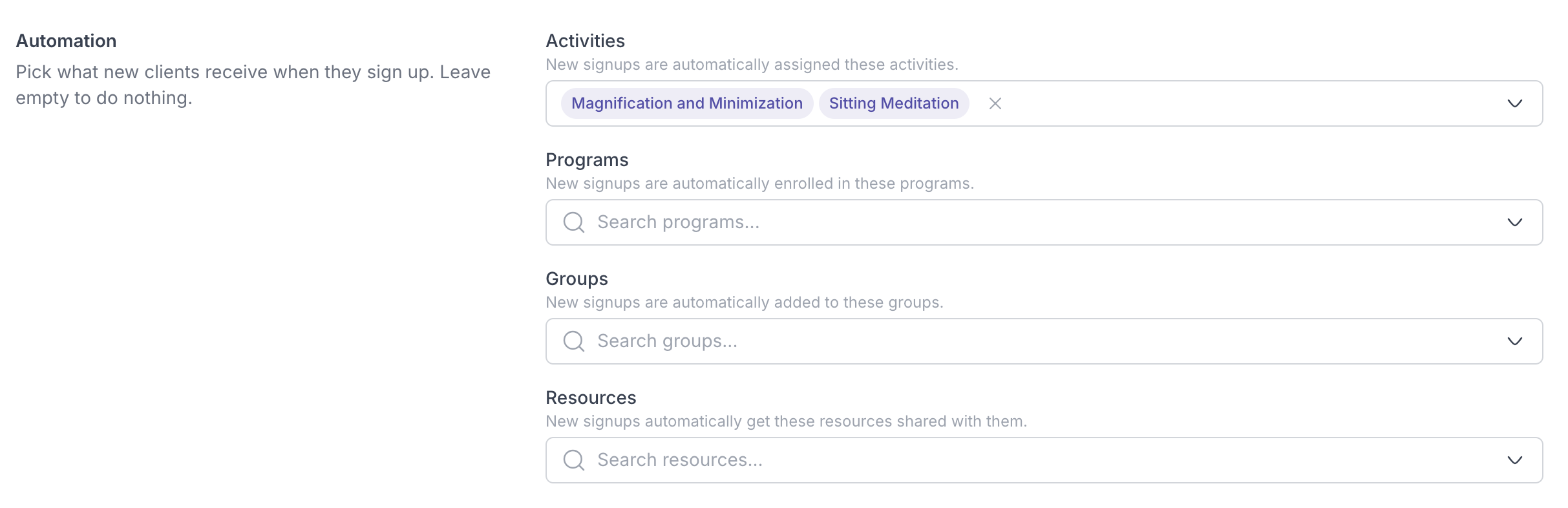
- Scroll to Automation in the form settings.
- Pick the activities, programs, groups, and resources you want new clients to receive.
- Click Save changes, then Publish changes.
From now on, everyone who joins through this form gets that content the moment they become active, without you touching anything.