
Create or Switch Workspaces
Your personal account can belong to several workspaces, and moving between them, or starting a new one, takes just a few clicks.
Switch workspaces
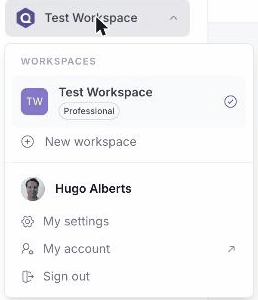
- Click your workspace name at the top left to open the workspace menu.
- Under Workspaces, select another workspace to switch to it.
Create a new workspace
- Open the workspace menu and click New workspace (or go to My account and open the My workspaces tab).
- In the Create a new workspace dialog, enter the first and last name you want clients and colleagues to see.
- Click Create workspace.
Quenza creates the new workspace and opens it. You can switch back to any of your workspaces at any time from this menu.